Why Logging Matters
[+] On This Page
The fault you cannot reproduce
Take this example. A user reports that a payment page failed at 14:05. You open the code. It looks correct. You run the same steps on your machine. Everything works.
The failure happened once, in production, with data you do not have. You cannot replay it. You should not stop a live system to debug it. The only evidence is what the system wrote down at the time.
That record is the log. If the log is good, you find the fault in minutes. If the log is poor, you guess.
Why logging matters
A log answers one question after the event: what happened?
This is useful for five reasons.
- You should not stop a live system to attach a debugger. A debugger stops the program, and a live system must keep running.
- Logs shorten the time to find a fault. You search a record and do not rebuild the event from memory.
- Logs are the record for security and audit questions. Who did this, and when?
- Logs show behavior that your tests did not predict. Tests check the cases you imagined. Production sends the cases you did not.
- Logs outlive the people who wrote the code. A new engineer can read what the system did without asking anyone.
What to log
Log events that help you answer “what happened?” later. Four kinds cover most needs.
- Requests and their result. Record the status, the duration, and the caller.
- Errors, with cause and context. “Operation failed” helps nobody. Record what the code tried to do, with which input type, and why it failed.
- Important business events. An order is placed. A user changes a password. A job finishes. These events show what the system does.
- Calls to other systems. Record the target, the duration, and the result. Faults often sit at a boundary.
Never log secrets, tokens, passwords, or personal data. A log is copied, searched, and kept for a long time. Many people can read it. A secret in a log is a leak that you made yourself.
How to log
Four habits make logs useful. Each one costs little at the start.
Use structured logs. Write each line as a record with fixed field names, for example JSON. Free text is easy to write and hard to search. A record lets you filter by field.
Give levels a clear meaning. Use error for a failure that needs action. Use warn for something unexpected that the system handled. Use info for normal events that matter. Use debug for detail that you need only when you investigate. Write the meaning down, so that every engineer picks the same level for the same case.
Put a correlation ID on every line of one request. Create the ID at the first entry point. Pass it to every call to another system. Put it on every line. Then one search shows the whole path of one request.
Use the same field names in every component. If one service writes user_id and another writes userId, a search must cover both. Choose one name and keep it.
A log line is an event. A machine must read it, and a person must read it. Structured fields serve the machine. A short, clear message serves the person.
The architecture view
Logging is a cross-cutting concern. Almost every part of a system needs it. This makes it easy to spread everywhere and hard to change later.
The way to control this is to keep the parts separate. Business code calls one small logging interface. It does not know where the logs go. Collection, storage, and alerting are separate parts. You can change any of them without touching business code.
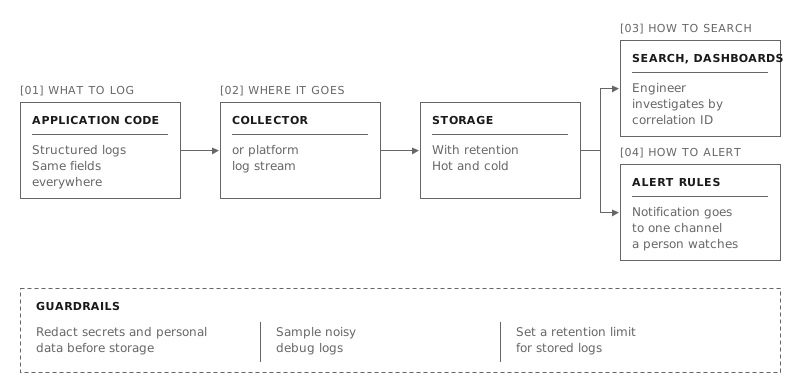
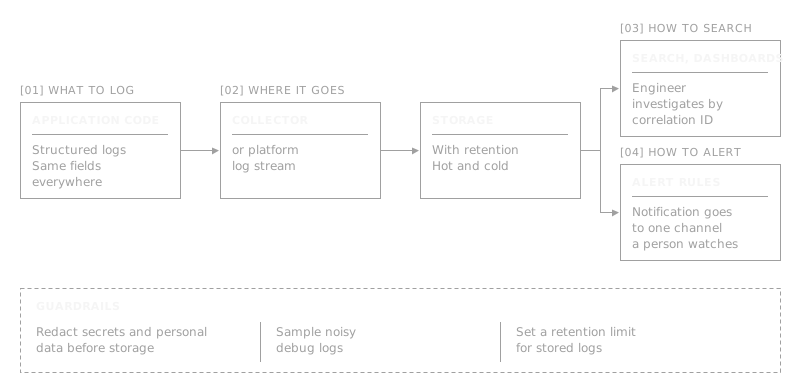
Read the figure from left to right.
- Application code writes structured logs. All components use the same fields.
- A collector, or the log stream of your platform, receives the lines.
- Storage keeps them under a retention rule. Recent logs stay in fast storage. Older logs move to cheaper storage.
- From storage, one branch leads to search and dashboards. An engineer investigates by correlation ID.
- The other branch leads to alert rules. A rule sends a notification to one channel that a person watches.
Three guardrails apply to the whole flow. Redact secrets and personal data before storage. Sample noisy debug logs. Set a retention limit.
Redaction belongs at one place: the logging boundary. This boundary comes before storage. If every call site must remember to redact, one of them will forget.
The figure answers four questions. What do we log? Where does it go? How do we search it? How do we alert on it?
Logs, metrics, and traces
You will hear about three kinds of signal.
- Logs say what happened.
- Metrics say how much. An example is the number of failed requests per minute.
- Traces say where the time went in one request that crosses many components.
Start with logs. They are the simplest and the most general. Add metrics and traces when a real question needs them, and not before.
Common mistakes
These mistakes appear again and again.
- Too little. The line you need was never written.
- Too much. Too many lines hide the useful ones, and storage costs grow.
- Unstructured text. You can read it, but you cannot query it.
- Secrets or personal data in logs. This creates a security problem and a legal problem.
- No correlation ID. You cannot link the lines of one request.
- An alert on every error. People learn to ignore alerts. Alert on symptoms that users feel, such as the error rate or a failed key event. Do not alert on each error line.
- No retention rule. Logs grow without limit, or vanish when you still need them.
- Nobody reads logs until an incident. Then the first reading happens under pressure. Read them when nothing is wrong, so you know what normal looks like.
A checklist for one afternoon
You can apply these six items in one afternoon.
- Switch your logs to structured records with fixed field names.
- Write down the meaning of each log level.
- Create a correlation ID at the entry point, and put it on every line.
- Move redaction to the logging boundary. Check that no secret or personal data reaches a log.
- Set a retention rule for your logs.
- Replace “alert on every error” with one alert on a symptom that users feel.
Decide early
Good logging is a design decision. You make it at the start, when the system is small. It costs little then. Adding it during an incident costs far more. You must change code, deploy it, and wait for the fault to happen again.
Write the logs that you will need to read during an incident.